Complex products, quoted in minutes, not weeks
Ignitionary is CPQ built for industrial manufacturers. Every configuration is checked against your engineering rules, priced from your real cost data, and delivered as a quote your customer can act on: drawings, BOMs, CAD files, and an AR view included.
Build a real quote in the live demo. Takes 2 minutes, no signup.
Systems Ignitionary integrates with. Not customer logos.









Ignitionary in a minute
Configure a part with the engineering checked as you go, price it from real costs, and send a quote your customer can act on. Shown in the product itself.
From catalog to signed-off quote
Watch the real flow, recorded from the live demo: pick a product, change the shape and power, and the 3D preview, engineering checks, and price follow it into a quote.


Everything above is the live demo. Open it and change the numbers yourself.
Quoting cut from 30–45 minutes to 3–5
An industrial heating element manufacturer had more than 200 engineering formulas spread across spreadsheets only a few engineers could read. Field sales had no access, so every quote queued behind engineering, and multiple copies of each spreadsheet had drifted out of sync.
We encoded those formulas into a configurator with validation on every input. Anyone on the team now configures a product in the browser and gets a live 3D view, a costed bill of materials, a generated spec sheet, and manufacturing routing exported into the ERP. New employees reach productivity in days instead of months, because the configurator is the training.
This engagement is where Ignitionary comes from. The patterns proven here are what the platform now productizes, and the tubular heater configurator embedded above is the direct descendant of that work.
Read the full customer story- 90%
- faster quoting: 30–45 minutes down to 3–5
- 200+
- engineering formulas encoded with validation
- 30+
- product types configurable by anyone on the team
- Zero
- calculation errors since go-live
Delivered by Uptimize Solutions LLC, the company behind Ignitionary. The customer is anonymized by request; details available in a sales conversation.
Connected to the Systems You Already Run
Configuration data flows both ways: pricing and inventory in from your ERP, orders and drawings out to production. No re-keying between systems.
Why Integrate with ERP?
Your ERP is the single source of truth for pricing, inventory, and order management. Connecting Ignitionary ensures configurations use real-time data and orders flow automatically into your fulfillment process.
Key Benefits
- Real-time Pricing: Pull current material costs, labor rates, and pricing rules directly from your ERP
- Inventory Validation: Prevent configurations using unavailable materials or components
- Automated Order Creation: Approved quotes automatically create sales orders in your ERP
- Bill of Materials Sync: Generate accurate BOMs that match your ERP structure
- Lead Time Accuracy: Use real manufacturing schedules for delivery estimates
Why Integrate with CRM?
Your sales team lives in your CRM. By integrating Ignitionary, every configured quote becomes part of your sales pipeline with full visibility and tracking.
Key Benefits
- Automatic Quote Logging: Every configuration saves as an opportunity in your CRM
- Customer Context: Load customer history, preferences, and pricing agreements automatically
- Sales Pipeline Visibility: Track which configurations convert and which don't
- Follow-up Automation: Trigger email sequences based on configuration activity
- Revenue Forecasting: Improve accuracy with detailed product configuration data
Why Integrate with CAD?
Bridge the gap between sales and engineering. Generate production-ready drawings and 3D models directly from customer configurations, eliminating manual design work.
Key Benefits
- Automated Drawing Generation: Create custom CAD files based on configuration parameters
- Parametric Model Updates: Drive CAD templates with configuration choices
- 3D Visualization: Show customers realistic product previews during configuration
- Engineering Validation: Ensure configurations meet design constraints and standards
- Faster Time to Production: Eliminate weeks of back-and-forth between sales and engineering
Why Integrate with Databases?
Your product rules, pricing logic, and configuration history are valuable assets. Direct database integration enables sophisticated analytics and complex business logic.
Key Benefits
- Centralized Rule Management: Store configuration rules in your database for version control
- Advanced Analytics: Query configuration data for insights on product trends and margins
- Custom Business Logic: Implement complex pricing and validation rules using SQL/NoSQL
- Historical Tracking: Maintain complete audit trail of all configurations and changes
- Multi-System Sync: Use your database as a hub for integrating multiple systems
Pricing, BOMs
Quotes
Pricing Data
Analytics
One configurator, two layouts
Every Ignitionary configurator opens two ways, with a switch in the corner. Buyers get a short guided path; your engineers get every option and the numbers behind them. Same product, same rules, same price.


Problems point at their fix in both layouts: each blocker names the field to change and a Go to button takes you there.
Configure a real product, right here
This is the live platform embedded on this page, the same way it can embed in your website. Configure a tubular heating element and watch the 3D preview, engineering checks, and price respond. Try the Simple / Detailed switch in its top corner. Demo data, real engine.

What happens when it cannot be built
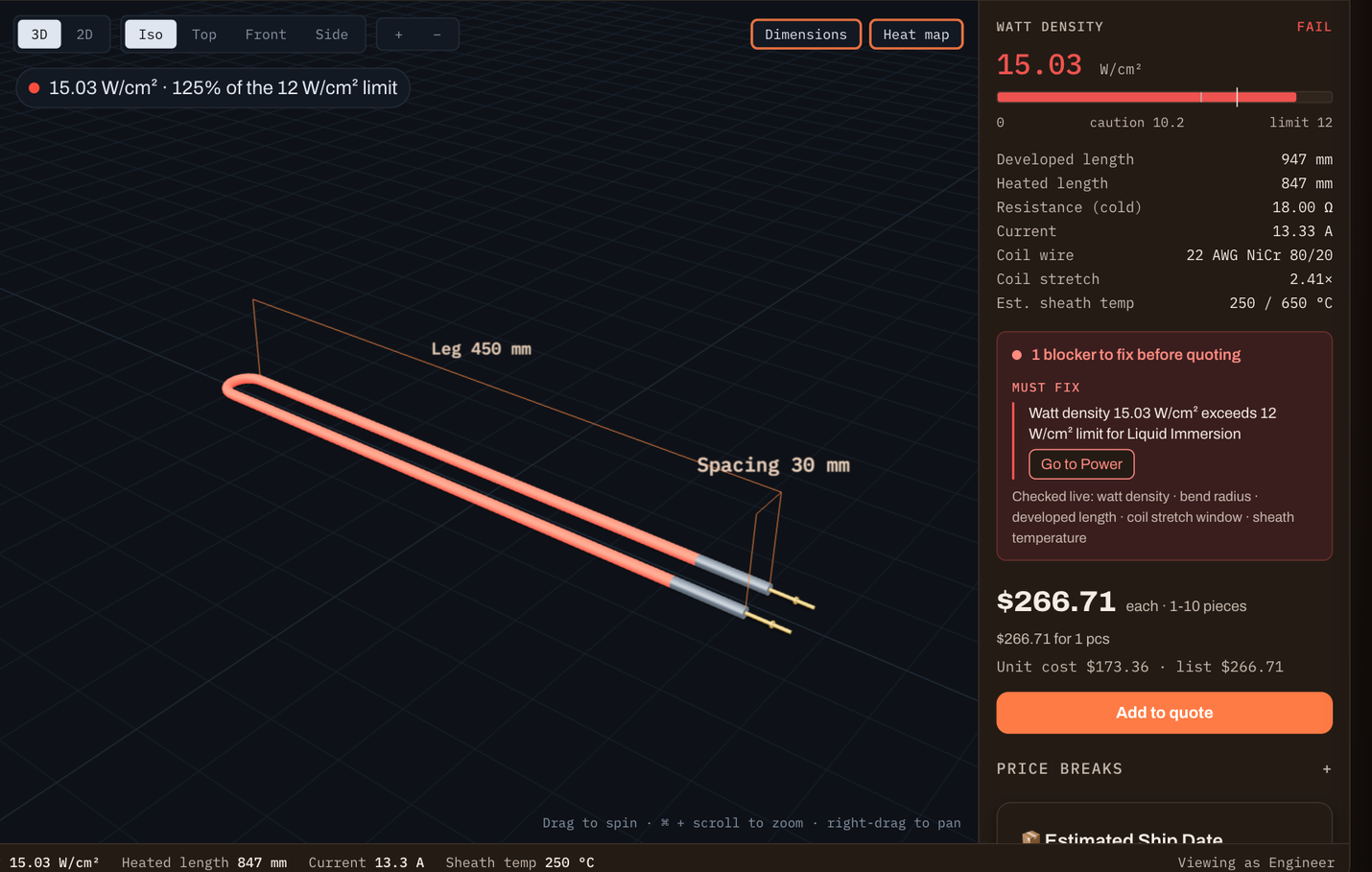
Take the element you just configured and ask for 3200 W instead of 2000. Nothing about the geometry changed, but the watt density on the heated surface now sits at 15.03 W/cm², and the limit for liquid immersion is 12. The configurator says so, in those terms, and stops. Then it points at the fix: the problem is listed under Must fix with a Go to Power button, and the step that holds the power setting is marked in red.
The spec sheet, the STL, the DXF, and the AR view all go unavailable at that moment. You cannot export manufacturing data for a part that would fail in service. That gate is the point: the check runs while the part is being configured, not after a customer has accepted a quote for something your shop cannot make.
Your rules will not be watt density. They will be your wall thicknesses, your bend radii, your torque ratings, your weld access. Those are the numbers we encode with your engineers, and they behave the same way once they are in.
What the platform does
Built from real configure-to-order work: guided selling, engineering validation, CAD output, and quotes your buyers can open, view in AR, and accept online.
Visual Configuration
Live 2D drawings and 3D previews update as options change, so buyers see exactly what they are ordering before it hits production.
Cost-Based Pricing Engine
Material, labor, setup, and volume tiers priced from your real cost model, with margin visible to your team and discount approvals built in.
Engineering Rules & DFM Checks
Compatibility rules, manufacturing constraints, and design-for-manufacturing checks keep invalid configurations from ever reaching a quote.
CAD & Drawing Output
Every configuration can export production-ready 2D drawings, STL and DXF files, and an accurate BOM for your shop floor.
Digital Quotes with AR
Quotes go out as shareable pages that track when buyers view them. A QR code opens the configured product in augmented reality, at true scale.
Customer Self-Service
A buyer-facing storefront lets customers configure and request formal quotes themselves. Guided selling walks new users to a valid product in a few questions.
Frequently Asked Questions
Cost, go-live time, integrations, and what we will not claim.
Two to eight weeks, including ERP integration. The range is about how much engineering has to be encoded, not about our queue. A single product line with a clear rule set lands at the short end. The heating element manufacturer in our customer story ran in five phases, starting with the configurator itself and adding ERP and CRM integration after, and used the platform in production from the early phases onward. Starting with your most complex or highest-volume product is usually the right call: it proves the hardest case first, and the rules you build there carry over.
Core is 1,500 dollars a month, Growth 3,500, Scale 6,500, and Enterprise is quoted against scope. Additional ERP connectors, CAD automation, and the embedded configurator for your own website are priced separately. The full breakdown, including what each tier includes, is on the pricing page.
Both, in that order. We build the first product line with your engineers, because getting the formulas right is the hard part and it is faster with the people who already know them. After that your team edits rules, pricing, and options through the admin interface. No code, and no ticket to us for a price change or a new option.
Yes, and this is the part we have done longest. There are built-in connectors for SAP, NetSuite, Microsoft Dynamics, Epicor, Infor, Acumatica, Sage, and SYSPRO on the ERP side, and Salesforce and HubSpot on the CRM side. Anything else goes over REST or webhooks. Data moves both directions: pricing, inventory, and BOM structure in, orders and drawings out.
Yes. The embedded configurator drops into your site with a snippet, white-labelled, and it is the same engine your sales team uses. The configurator embedded on this page is that feature running live, not a mockup of it. It is a usage-priced add-on rather than part of the base plan.
Complex enough that spreadsheets were the previous answer. The customer story on this site encodes more than 200 engineering formulas with validation on every input: wattage, sheath material, geometry, and termination all interacting. Pricing handles volume breaks, material surcharges, dimensional calculations, labor time, and customer-specific tiers, and rules can pull from external data. If a rule is too strange to express, we will tell you in the intro call rather than after the contract.
Data is encrypted in transit and at rest, and access is controlled by role. Enterprise adds a contractual SLA and supports on-premise and custom integrations for teams with data residency requirements. We are not going to claim certifications we do not hold; if you have a security questionnaire, send it and we will answer it line by line.
Email support on every plan, priority response on Growth, a named account manager on Scale, and a contractual SLA on Enterprise. Written documentation covers integration and setup. There is no chat queue, no community forum, and no 24/7 line, because there are not enough of us to staff those honestly yet.
No. Upload the workbook and Ignitionary compiles it: your input cells become configurator fields, every formula on the way to the price becomes a calculation, and lookup ranges become tables. It then re-runs the result against the numbers Excel saved in the file and shows how many cells match. A formula it cannot translate is held at the workbook's value and listed for review, never dropped.
Yes. STEP, IGES, DXF and STL files are measured directly: overall size, thickness, holes and the notes on the drawing. Those measurements fill an existing configurator for review, or start a new configurator for the part. Native formats such as SolidWorks or DWG need exporting to STEP or DXF first.
About Ignitionary
Ignitionary is a CPQ (Configure, Price, Quote) and product configurator platform built for manufacturers of machinery, industrial equipment, and other complex engineered products. It combines rules-based configuration, a dynamic pricing engine, automated quote generation, and CAD, ERP, and CRM integration in one platform, so every quote is buildable, priced right, and ready for production.
Ignitionary is developed and operated by Uptimize Solutions LLC, built on 25+ years of hands-on experience in manufacturing and distribution IT, ERP integration, and product configuration. Explore all solutions and industry configurators, or talk to us about your products.
Why we built Ignitionary
We spent 25 years building and integrating the systems manufacturers actually run: ERP, CAD, shop-floor data, and the spreadsheets holding the quoting process together in between. Every project hit the same bottleneck. Sales waits on engineering to check whether a configuration can be built. Engineering waits on sales to clarify what the customer meant. The quote goes out days later, and sometimes it goes out wrong.
Ignitionary is the tool we kept wishing existed on those projects: configuration rules an engineer trusts, pricing a controller trusts, and a quote a buyer can open, view in AR, and accept without another phone call. We build it alongside working manufacturers, and the live demo is the actual product, not a video. Read about the founder and the company, see what shipped recently, or browse every solution by industry and system.
Uptimize Solutions LLC
See your own product configured
Bring one product to a 20-minute intro call. We will sketch how its rules, pricing, and outputs would work in Ignitionary.
Not ready to talk? The live demo needs no signup. Need something to forward internally? Grab the one-page datasheet (PDF).